Skip to content

Stop guessing.
Go look.

Triagic is an AI agent for support teams. It investigates each ticket, and the questions around it, by querying the databases, logs and metrics you already run. Read-only, every query shown. Answers come from your live infrastructure, not a knowledge base.

  • A desktop app for the team, a web portal for admin
  • No credit card for the trial
  • Your own model key
  • Read-only credentials
  • ₹1,760 per seat per month (≈ $20 USD), add-ons optional

The ledger: what came in, what Triagic read, what it found

Eight ordinary days at a software company. Each row is something that came in, what Triagic read to answer it, and what it found. Open one.

  • What it read, in order. All of it read-only.

    1. 1zendeskread ticket #4821Personal data is redacted before the model sees any of it.
    2. 2postgresSELECT status, count(*) FROM orders WHERE region='eu' GROUP BY status41 failed, 3 paid since 14:00. Ran inside a read-only transaction.
    3. 3sentrynew issues since 14:00312 new StripeCardError events, first seen 14:02 UTC.
    4. 4githubrecent releasesThe onset matches release 2026.08.02-checkout-refactor, deployed 13:58.

    EU card charges started failing at 14:02 UTC, four minutes after the checkout-refactor rollout. US and APAC are clean.

    What changed

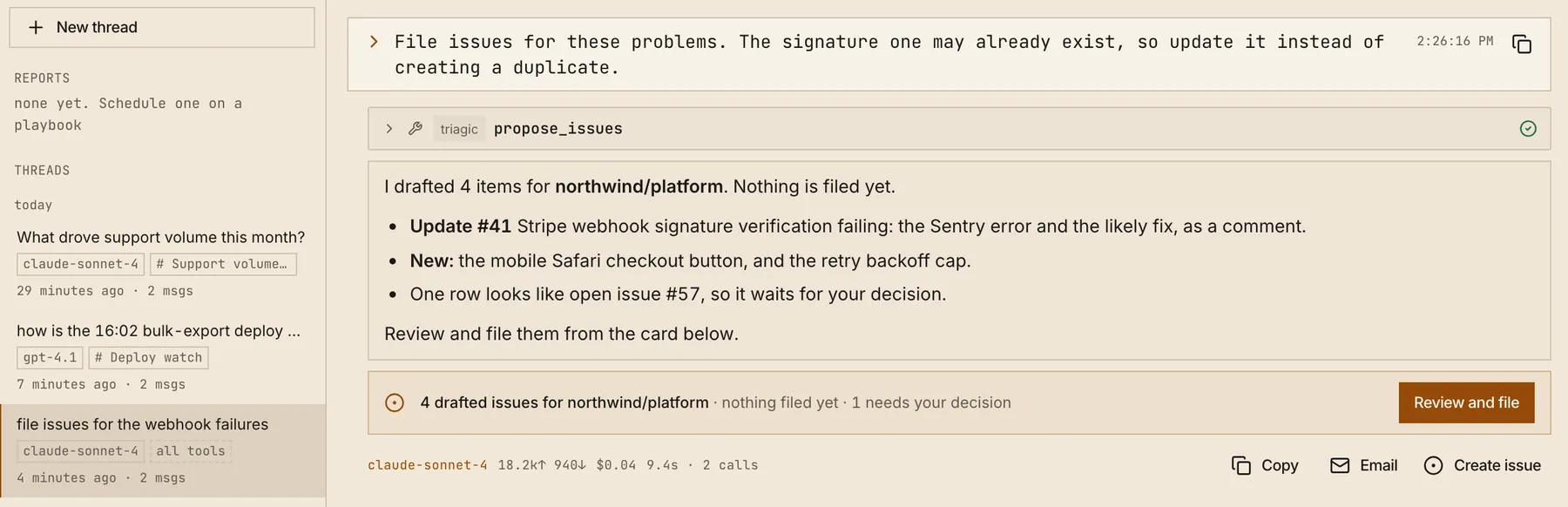
    Open for 67 minutes, handled by support alone. Engineering heard about it once, as a filed issue with the root cause, the rollback target and four pieces of evidence.

    Instead of: A message in #eng-oncall, two people, 42 minutes before anyone had looked.

    Read the full record
  • NextYour teamThe ticket you’d escalate today.Not found yet. 14 days to find out: no card, your own model key, read-only credentials.Start the trial

Read-only by design

The AI investigates. It doesn't get to change anything.

Postgres connections run every query inside a read-only transaction, MongoDB's read-only flag is on by default, and the Kubernetes connector explicitly disables every destructive tool. MySQL runs a server Triagic writes itself: four fixed schema-browsing tools and no general SQL tool. Investigating a ticket should never mean risking the system it's about.

Every call
Listed as it runs, with its query or its arguments. If a number looks wrong, you can read how it was produced.

postgresSELECT status, count(*) FROM orders WHERE region='eu' GROUP BY status

41 failed, 3 paid since 14:00. Ran inside a read-only transaction.

From Zendesk ticket #4821, the first row above.
Personal data
Email addresses, phone numbers and IDs in a ticket are redacted before any of it reaches the model.
Replies
Drafted from the evidence, sent by a person. The agent has no email tool, by construction.
Code review
Reads the diff through the API. It never checks the code out and it can't push.
The model
Your own OpenAI, Anthropic, Azure, Gemini, OpenRouter or Ollama key. Spend runs against your contract, not a shared account.

Where that happens in the app

Everything Triagic does

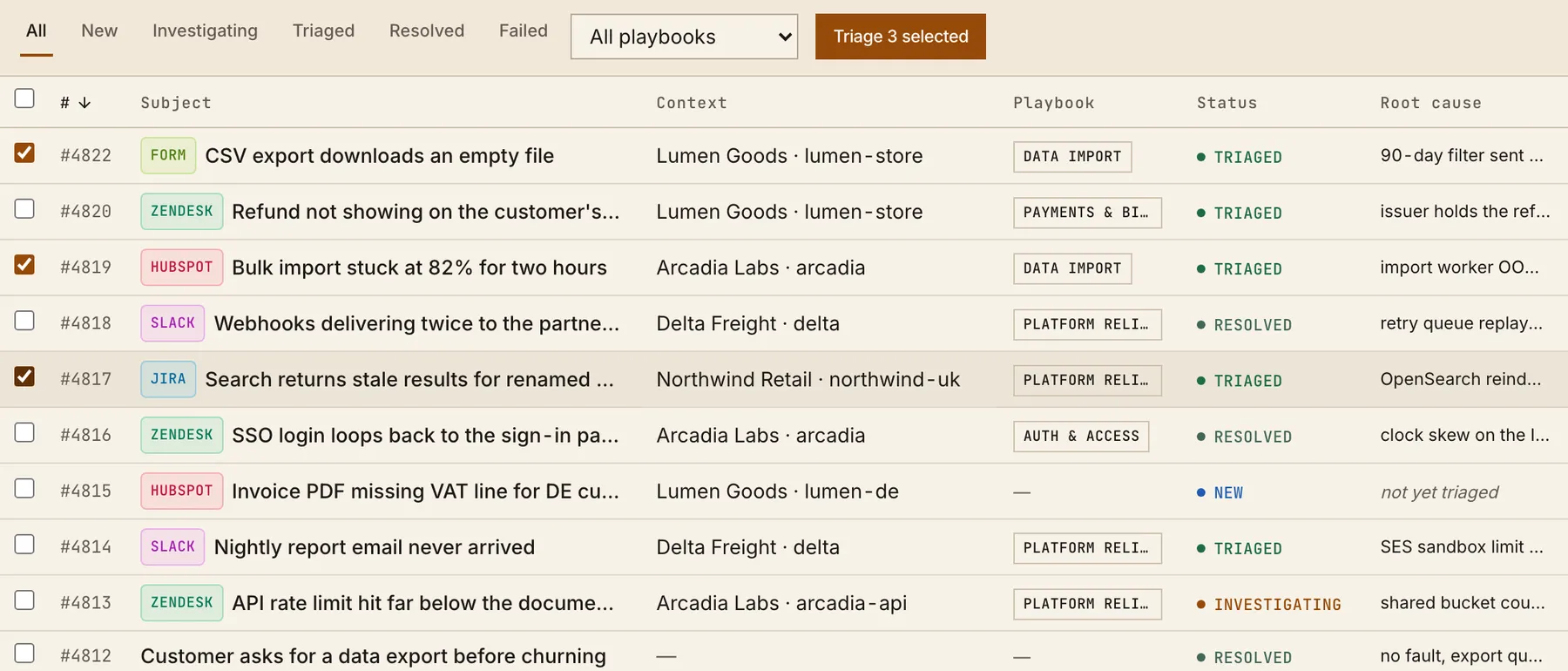
Slack, manually filed tickets, and submissions to your own hosted intake forms triage as they arrive. Connected sources (HubSpot, Zendesk, Jira, email threads) stay off until you turn them on, so you can start with one queue instead of the whole company. Either way, triaged tickets reach the right playbook and team before anyone opens them.

The Tickets queue in the Triagic desktop app. Each ticket shows its source (form, Zendesk, HubSpot, Slack, Jira), the customer, the playbook it was routed to, its status and a one-line root cause.
Tickets, in the desktop app. Demo workspace.

57 systems it can read

Each one connects through an MCP server (the open standard for giving AI agents tool access) that you configure with your own credentials. No data pipeline, no syncing your database into a third party. Bring any MCP server of your own as well.

Give your support team a way to actually check.

Install the desktop app, connect your own AI provider key and read-only credentials, and run your first real investigation in minutes. Team config lives in the web portal.